Digital connectivity has become deeply embedded in everyday life. Personal communication, financial transactions, remote work, entertainment, and home management increasingly rely on internet-enabled devices and cloud-based services. Smartphones, laptops, smart home systems, and wearable technologies constantly exchange data across global networks. While this connectivity enables efficiency and convenience, it also expands exposure to cyber threats targeting personal data, credentials, and digital identities.
Cybersecurity is often associated with large organizations or government systems, but individual users face similar risks. Phishing attacks, credential theft, malware infections, identity fraud, and data breaches can affect anyone interacting with digital platforms. Effective protection does not rely on a single tool or practice but on layered security measures that reduce vulnerabilities across devices, accounts, and networks. Understanding these layers provides a foundation for safer digital habits.
Understanding the Modern Threat Landscape
Everyday users encounter a broad range of cyber threats that evolve alongside technology. Awareness of these threats is the first step in securing personal data.
Common Cyber Threats
- Phishing Attacks:
Phishing remains one of the most common attack methods, using deceptive emails, text messages, or websites designed to steal login credentials or financial information. Attackers often impersonate legitimate organizations and rely on urgency or fear to prompt immediate action. - Malware Infections:
Malicious software can infiltrate devices through compromised downloads, infected attachments, or unsecured websites. Once installed, malware can track keystrokes, encrypt files for ransom, or provide remote access to attackers. Early detection is critical to limit damage. - Credential-Based Attacks:
Weak or reused passwords can be exploited easily. Data breaches from one platform may expose usernames and passwords that attackers test across multiple accounts. The more services a person uses online, the higher the exposure risk. - Unsecured Networks:
Public Wi-Fi networks and poorly secured home routers can expose sensitive information if encryption is absent. Understanding these risks encourages proactive measures to secure both networks and connected devices.
Strong Authentication and Account Security
Authentication is the first line of defense for personal cybersecurity. Adopting strong account protection practices significantly reduces the risk of unauthorized access.
Password Best Practices
- Use complex passwords that combine letters, numbers, and symbols.
- Opt for long passphrases rather than simple words to increase computational difficulty for attackers.
- Avoid reusing passwords across multiple accounts.
Password Management Tools
Password managers help generate and store unique credentials for each account. These tools encrypt stored passwords and allow users to access them securely across devices while maintaining controlled authentication processes.
Multi-Factor Authentication (MFA)
MFA adds an extra layer of protection beyond passwords. Common methods include:
- One-time codes sent to mobile devices
- Hardware security keys
- Biometric verification, such as fingerprint or facial recognition
MFA can prevent unauthorized account access even if a password is compromised.
Account Monitoring
Many platforms provide alerts for new logins, password changes, or unusual activity. Prompt awareness of unauthorized attempts allows users to act quickly, change credentials, and review account settings. Layered authentication minimizes the risk of account takeover and identity theft.
Device Security and Software Maintenance
Personal devices serve as gateways to digital services, making proper device maintenance critical.
Keep Software Updated
Operating systems and applications regularly release updates to fix vulnerabilities. Delaying updates leaves devices exposed to exploits. Enabling automatic updates ensures timely installation of security patches.
Endpoint Protection
Integrated security software such as antivirus programs, firewalls, and behavioral monitoring tools help detect and mitigate malicious activity. While no single tool eliminates all risks, comprehensive endpoint protection reduces threats by offering continuous scanning and alerts.
Device Encryption
Encryption protects stored data in the event of physical loss or theft. Full-disk encryption ensures that data remains inaccessible without authentication credentials. Most modern operating systems offer built-in encryption features that users can activate during setup or security configuration.
Physical Security
Physical measures complement digital protections. Lock devices when unattended, use screen locks, and secure devices from unauthorized access. In shared environments, creating separate user accounts with limited privileges prevents accidental exposure of sensitive information.
Network Protection and Secure Connectivity
The security of home and public networks plays a critical role in protecting personal data.
Home Network Security
- Use strong administrator passwords for routers
- Regularly update router firmware
- Disable default credentials
- Enable advanced encryption protocols such as WPA3
Virtual Private Networks (VPNs)
VPNs encrypt internet traffic between devices and remote servers, reducing exposure on public networks. While VPNs do not eliminate all risks, they provide an extra layer of protection when using unsecured Wi-Fi connections.
Network Segmentation
Preventing lateral movement in the event of a device compromise is possible by separating smart home devices from primary computing systems. Network segmentation isolates entertainment systems, IoT devices, and personal computers, limiting potential damage.
Keeping Devices Updated
Internet service providers and device manufacturers regularly release updates addressing known vulnerabilities. Maintaining updated networking equipment ensures compliance with evolving encryption standards and reduces exposure to outdated security protocols.
Safe Digital Habits and Data Awareness
Technical safeguards are most effective when complemented by informed user behavior.
Recognize Suspicious Activity
- Verify email senders and message authenticity
- Avoid clicking on unrequested links or attachments
- Be cautious of unexpected requests or urgent instructions
Data Minimization
- Limit personal information shared online
- Review privacy settings on social media platforms
- Restrict public visibility to reduce identity exploitation
Backup Strategies
Regularly back up essential data to external storage or encrypted cloud services. In the event of ransomware attacks or unintentional data loss, backups offer options for recovery.
Stay Informed
Understanding how platforms collect and use data allows users to make informed decisions about permissions and privacy settings. Awareness of emerging threats enables adaptive protection strategies that evolve with technology.
Protecting Personal Data in Emerging Digital Environments
The rise of smart home devices, wearables, and connected vehicles introduces new cybersecurity considerations.
Smart Devices and Wearables
- Review manufacturer security features
- Configure privacy settings for location, health, and behavioral data
- Ensure firmware updates are applied regularly
Cloud Storage and Synchronization
Cloud-based storage provides convenience but requires careful configuration. Align access permissions with intended sharing preferences, and always enable encryption during storage and transfer of sensitive data.
Protecting Vulnerable Users
Children and elderly family members may face unique digital risks. Implement parental controls, content filtering, and device usage guidelines to manage exposure. Educating family members about safe online behavior strengthens overall household cybersecurity.
Coordinated Ecosystem Security
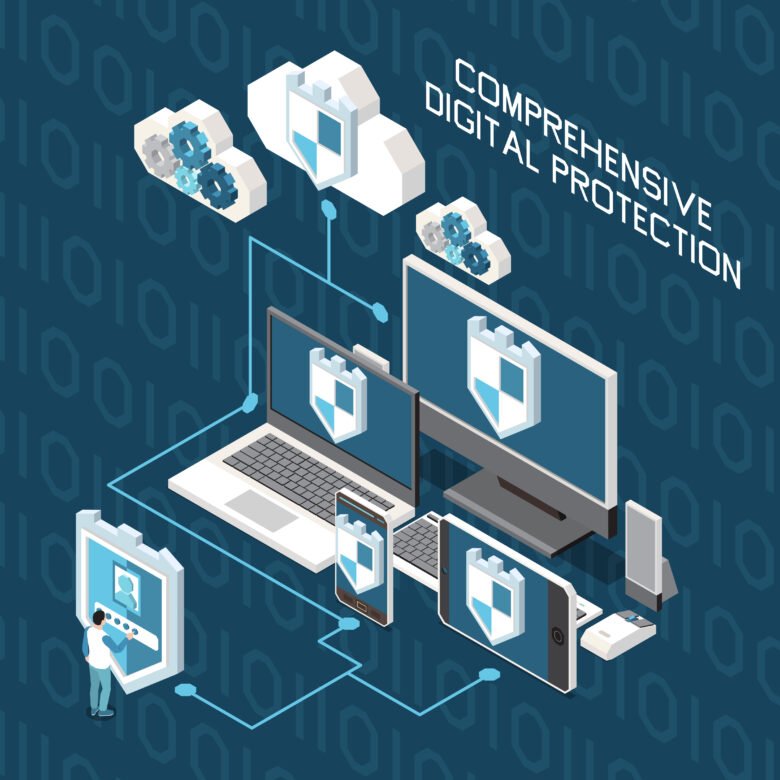
Cybersecurity extends beyond individual devices. Coordinated protection of accounts, networks, and connected technologies creates a harmonized defense. As digital services become integral to daily routines, comprehensive strategies are essential for maintaining data security and privacy.
Conclusion
Cybersecurity for everyday users depends on layered defenses across devices, accounts, and networks. Strong authentication, regular software updates, encrypted connectivity, and informed digital habits collectively reduce exposure to common threats. No single measure provides complete protection, but combined practices create resilience against unauthorized access and data compromise.
As digital connectivity expands into homes, workplaces, and mobile environments, personal cybersecurity is an ongoing process rather than a one-time setup. Using flexible methods that mix technical protections with user knowledge helps improve digital security in a fast-changing environment. Sustained attention to these layered defenses ensures data privacy and secure participation in an increasingly connected world.
FAQs
1. What are the most common cybersecurity threats for individual users?
Common threats include phishing attacks, malware infections, credential-based attacks, identity theft, and unsecured networks. Awareness and protective measures reduce risk.
2. How can I create strong passwords for my accounts?
Use complex, long passwords combining letters, numbers, and symbols. Avoid reuse across accounts and consider using a password manager for secure storage.
3. Why is multi-factor authentication important?
MFA adds an extra verification step, such as a code or biometric check, preventing unauthorized access even if a password is compromised.
4. How can I secure my home Wi-Fi network?
Set a strong router password, enable WPA3 encryption, update firmware regularly, and consider separating devices onto segmented networks.
5. How do I protect data on my devices and cloud accounts?
Enable device encryption, keep software up to date, regularly back up important data, and configure cloud storage permissions carefully.