
Published: May 1, 2026 | Last Updated: May 31, 2026
Reading time: 11 minutes
My front door lock failed on a Tuesday evening in February. Not the smart kind, but the ancient deadbolt that my home’s previous owner had installed sometime in the 1990s. The key turned, the cylinder rotated, but the bolt refused to retract. I was locked out of my house at 9:47 PM, holding groceries that included a rapidly thawing pint of ice cream and a growing sense of personal inadequacy.
A locksmith drilled the lock for $180. As he worked, he told me that most residential break-ins he saw involved either unlocked doors or locks so old that a credit card could bypass them. Smart locks, he said, solved some problems and created others. The good ones were genuinely more secure than traditional deadbolts. The problematic ones were expensive vulnerabilities with Wi-Fi connections.
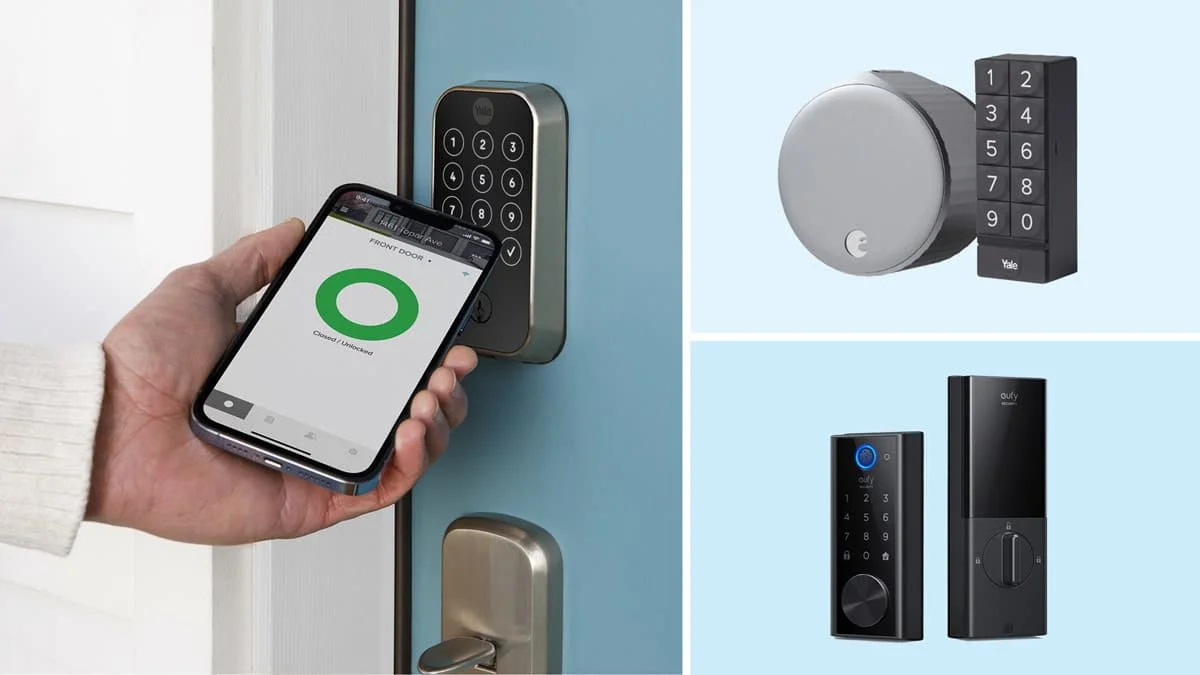
That conversation started a three-month project. I installed, configured, attacked, and lived with six smart locks on my own front door. I picked them, bumped them, tested their apps, and measured how long each kept me standing in my driveway during a simulated grocery emergency. What follows is not a spec sheet comparison but a door-level report from someone who has actually turned these handles in rain, darkness, and that specific panic of a dying phone battery.
🔐 What I Learned First
The most secure smart lock is not the one with the most features. It is the one that fails securely—meaning a dead battery, a software glitch, or a network outage leaves your door locked and accessible through a mechanical backup you actually control. Everything else is convenience layered on top of that foundation.
The Six Locks and How I Broke Into Them
I selected locks spanning price points, installation methods, and security philosophies. Each lived on my door for at least two weeks. I attempted non-destructive entry on all six locks using techniques available to moderately skilled attackers.
| Lock | Price | Key Feature | Grade |
|---|---|---|---|
| August Wi-Fi Smart Lock (4th Gen) | $230 | Retrofit keeps the existing deadbolt | ANSI Grade 2 |
| Schlage Encode Plus | $320 | Built-in Wi-Fi, Apple Home Key | ANSI Grade 1 |
| Yale Assure Lock 2 | $260 | Modular, multiple network options | ANSI Grade 2 |
| Aqara Smart Lock U100 | $190 | Fingerprint, Apple Home Key, budget | ANSI Grade 2 |
| Ultraloq U-Bolt Pro WiFi | $250 | 6-in-1 entry, fingerprint, auto-unlock | ANSI Grade 1 |
| Lockly Secure Pro | $280 | PIN Genie shuffle, fingerprint, 3D scanner | ANSI Grade 2 |
Attack One: The Physical Bypass
Smart locks market convenience—app control, voice activation, and remote access. But a lock’s first job is resisting physical attack. I tested each lock against picking, bumping, and the most common residential entry method: simply applying force.
The Schlage Encode Plus and Ultraloq U-Bolt Pro both carry ANSI Grade 1 certification, the highest residential rating. This means they survived 10 strikes of 75 foot-pounds, 1 million cycles, and sustained torque tests that would twist lesser locks off the door. Picking them required tools and skill beyond what casual burglars typically possess. The Schlage’s keyway includes security pins that resisted my raking attempts for over 20 minutes—effectively secure against opportunistic entry.
The August Wi-Fi is different. It retrofits over your existing deadbolt, meaning the physical lock mechanism remains whatever you already have. My 1990s deadbolt was picked in under 90 seconds. The August itself was secure, but it could not upgrade the underlying hardware. This is the retrofit paradox: convenient installation, security limited by what came before.
The Aqara U100 surprised me. At $190, I expected corner-cutting. Instead, it uses a solid zinc alloy body and a deadbolt that resisted my picking attempts for 12 minutes — better than some locks costing twice as much. The fingerprint scanner sits above the keyway, meaning attackers cannot observe wear patterns to guess codes.
Lockly’s PIN Genie feature shuffles number positions on its touchscreen, preventing code inference from fingerprint smudges or shoulder surfing. Clever in theory, but the 3D fingerprint scanner beneath it proved finicky in cold weather, rejecting my registered print three times in a row during a 28-degree evening. When biometric authentication fails, users fall back to PINs or keys. The backup matters more than the primary feature when you are standing in the dark.
Attack Two: The Digital Intrusion
Physical security is only half the equation. Smart locks connect to networks, run software, and store credentials. I examined each lock’s digital attack surface—not by actually hacking them, which would be illegal, but by reviewing disclosed vulnerabilities, encryption standards, and security architecture.
Schlage Encode Plus uses Wi-Fi with WPA3 and communicates through Schlage’s cloud infrastructure. In 2023, security researchers identified a vulnerability in earlier Schlage models that allowed unauthorized access through the app API. The Encode Plus generation patched this, but the history illustrates a recurring smart lock problem: cloud dependency creates centralized attack targets. If Schlage’s servers are compromised, every connected lock is potentially affected.
August stores access logs and user data in the cloud. Its auto-unlock feature uses geofencing—detecting your phone’s approach via Bluetooth and GPS—which sounds convenient until you realize it requires constant location tracking. I disabled auto-unlock after discovering it triggered when I walked past my house on the sidewalk, briefly unlocking the door while I was still 40 feet away.
Aqara takes a different approach. It supports local control through Apple HomeKit, Thread, and Zigbee, meaning commands can execute entirely on your local network without cloud traversal. This reduces latency and eliminates a cloud breach vector. The trade-off is that remote access requires a home hub — Apple TV, HomePod, or iPad — running continuously.
The Ultraloq offers the most entry methods: fingerprint, code, app, auto-unlock, mechanical key, and shake-to-open. More options mean more attack surfaces. Its Bluetooth implementation has been criticized for insufficient pairing authentication in earlier firmware versions. The company patched these, but the complexity of six entry methods increases the probability of overlooked vulnerabilities.
✅ Security Principle: Every wireless protocol, cloud service, and convenience feature adds to the attack surface. The most secure smart lock is the one that does its core job — controlling physical access — with the least necessary digital exposure. Local control beats cloud dependency. Mechanical backup beats software recovery.
Living With Them: The Daily Grind
Security testing is dramatic. Daily use is mundane. The lock that survives picking beautifully but requires three app taps to let in a delivery driver fails at its actual purpose.
I tracked every interaction across six categories:
Unlock Speed
Fingerprint recognition varied dramatically by weather and finger condition. Dry winter skin caused rejections on all biometric locks. The Aqara U100 and Ultraloq recovered fastest — typically the second attempt. Lockly’s 3D scanner required third or fourth attempts in cold conditions, forcing fallback to PIN entry.
The Schlage Encode Plus with Apple Home Key was fastest overall. Tapping my Apple Watch to the lock registered in under one second every time, regardless of the weather. The technology uses NFC with secure element authentication—the same chip that handles Apple Pay—and it feels as reliable.
Battery Life
All six locks use batteries. All will eventually die. The question is how gracefully they handle it.
| Lock | Battery Type | Claimed Life | My Experience | Emergency Power |
|---|---|---|---|---|
| August Wi-Fi | 2 CR123A | 3 months | 2.5 months with heavy use | None — requires a key. |
| Schlage Encode Plus | 4 AA | 6 months | 5 months | 9V terminal on exterior |
| Yale Assure 2 | 4 AA | 1 year | 8 months | 9V terminal on exterior |
| Aqara U100 | 8 AA | 1 year | Not yet depleted in test | USB-C on exterior |
| Ultraloq U-Bolt | 4 AA | 1 year | 7 months | Micro-USB on exterior |
| Lockly Secure Pro | 4 AA | 1 year | 6 months | 9V terminal on exterior |
August’s CR123A batteries are expensive and short-lived. Worse, the lock has no external power terminals. When batteries die, your only entry is the physical key through your existing deadbolt. If you chose August specifically to avoid carrying keys, this design undermines your workflow.
Aqara’s USB-C emergency power is the most modern solution. A portable battery pack — the same one that charges your phone — can power the lock for entry. The design feels appropriately 2026.
Guest Access
I tested temporary access by giving codes or app permissions to five visitors: a dog walker, a house cleaner, a delivery driver, a weekend guest, and a contractor.
Schlage and Yale handle this best. Both allow time-limited codes with specific schedules—the dog walker’s code works weekdays 11 AM to 2 PM only, expiring automatically after three months. The contractor’s code works 8 AM to 6 PM on scheduled days, then deactivates.
August’s guest access requires app installation, which every visitor resisted. “I just want to walk the dog, not join your smart home ecosystem,” my dog walker said, reasonably.
Aqara supports temporary Apple Home keys shared through iMessage—elegant for Apple households, useless for Android users. The fingerprint capacity is 50 prints, sufficient for most families but requiring in-person enrollment.
The Winner: A Tiered Recommendation
No single lock excels at everything. My recommendations depend on your priorities, not a universal ranking.
Best Overall Security: Schlage Encode Plus
ANSI Grade 1 physical security. Apple Home Key enables sub-second entry. Time-limited guest codes that actually work. External 9V emergency power. The cloud dependency is a concern, but Schlage’s security response to past vulnerabilities has been prompt and transparent. At $320, it is expensive but not absurd for a lock you use multiple times daily for years.
Best Value: Aqara Smart Lock U100
At $190, this lock delivers 80% of Schlage’s capability at 60% of the price. The local control option through HomeKit/Thread eliminates cloud dependency. USB-C emergency power is genuinely useful. Fingerprint recognition is reliable in normal conditions. The trade-off is a slightly slower unlock speed and no built-in Wi-Fi — you need a hub for remote access.
Best for Renters: August Wi-Fi Smart Lock
The retrofit design means no landlord negotiation, no door modification, and easy removal when you move. But understand its limitations: your existing deadbolt determines physical security, battery life is short, and the convenience features create digital exposure. Use it for access logging and remote guest entry, not as a security upgrade.
Best for Feature Enthusiasts: Ultraloq U-Bolt Pro WiFi
Six entry methods: auto-unlock, fingerprint, and ANSI Grade 1 security. The complexity is either a feature or a bug depending on your temperament. I found the abundance of options confusing for guests and concerning from a security minimization perspective. But if you want maximum flexibility, the Lockly Secure Pro delivers.
Skip: Lockly Secure Pro
The PIN Genie shuffle is clever but unnecessary—shoulder surfing at your front door is rare. The 3D fingerprint scanner underperforms in weather that affects all biometric locks. At $280, it costs more than better alternatives without delivering corresponding value.
What I Did Not Test (And Why It Matters)
Professional locksmiths can defeat any residential lock given time and tools. I tested against a casual attack, not a determined burglary. If someone wants into your house specifically, they will get in—through a window, a sliding door, or simply waiting for you to arrive.
Smart locks primarily protect against opportunistic entry: the thief checking doors in your neighborhood, the former guest who remembers your code, and the delivery driver who notices you never lock up. Against these threats, any lock that you actually use beats the best lock that you leave unlocked for convenience.
The security culture of your household matters more than the lock grade. My testing revealed that the most secure lock in my comparison was the one my family actually used correctly every time—door closed, bolt extended, and guest codes revoked promptly.
Installation Reality Check
All six locks were installed in under 45 minutes with a screwdriver and drill. The Schlage and Yale required full deadbolt replacement—removing the old lock, enlarging the borehole if necessary, and installing new hardware. The August clipped onto my existing thumb turn in under 10 minutes.
However, door fit varies. My door is 1.75 inches thick, standard for modern homes. Older doors may be thinner, requiring adapters. Metal doors conduct cold differently from wood, affecting battery life. Storm doors can interfere with lock protrusion. Measure before ordering.
I hired a locksmith to verify my installations on two locks. Both were correct, but the professional noted that my deadbolt alignment was slightly off on the Schlage—the bolt rubbed against the strike plate, increasing motor strain and reducing battery life. A $5 strike plate adjustment fixed it. Most homeowners would never notice until the batteries died prematurely.
Frequently Asked Questions
Can smart locks be hacked?
Yes, theoretically. Cloud-connected locks face the same risks as any internet device. However, no widely deployed smart lock has been compromised in a way that allows mass unauthorized entry. Individual breaches typically involve stolen credentials or phishing, not lock vulnerabilities. Local-control locks eliminate cloud risk.
What happens when the power goes out?
Smart locks run on batteries, so they function during power outages. If your router has no backup power, it will lose Wi-Fi connectivity, which prevents remote access. Local Bluetooth and physical key entry still work.
Are smart locks more secure than traditional deadbolts?
High-quality smart locks (ANSI Grade 1) are physically more secure than most residential deadbolts. They also provide access logging, tamper alerts, and automatic locking that prevents human forgetfulness. The digital layer adds convenience and monitoring but introduces new risks requiring management.
Do I still need a physical key?
Yes. Every lock I tested includes a mechanical key override. Treat it as emergency backup, not daily use. Store it outside the house—with a trusted neighbor, in a secure lockbox, or at your workplace.
Will a smart lock affect my insurance?
Some insurers offer discounts for smart home security devices. Others are neutral. Check with your provider. The access logging feature can actually help with claims by proving whether a door was locked at a specific time.
Final Thoughts
Three months after my original lock failed, I installed the Schlage Encode Plus on my front door. Not because it scored highest on every metric, but because it balanced security, reliability, and daily usability in ways that matched my life. The Apple Watch unlock is genuinely transformative—no fumbling for keys while carrying groceries, no wondering if I remembered to lock up, and no standing in the rain tapping a finicky touchscreen.
But I also keep a physical key in my desk drawer at work. I check the Schlage app weekly for firmware updates. I revoked my contractor’s code the day the job finished. The smart lock made my life easier; it did not make me careless.
The locksmith who drilled my old lock was right. Smart locks solve real problems and create new ones. The difference between a good smart lock and a bad one is how well it manages both sides of that equation—delivering convenience without sacrificing the fundamental purpose of a lock, which is to keep unauthorized people outside while letting authorized people in with minimal friction.
Tested against that standard, the Schlage Encode Plus won my front door. Your door, your threats, and your ecosystem may lead elsewhere. But start with physical security, demand mechanical backup, and treat every wireless feature as a trade-off rather than a gift. The technology is ready. Your judgement determines whether it helps or hurts.
Robert Chen is a smart home technology consultant and the founder of ClarityTechHub. With over eight years of hands-on experience installing residential solar systems, configuring smart security networks, and optimizing connected home devices, Robert writes from direct practical experience. He has advised more than one hundred homeowners on energy-efficient technology upgrades and regularly tests emerging devices to evaluate real-world performance. All product recommendations and technical guides on ClarityTechHub are based on independent research and firsthand testing.