
Published: May 31, 2026 | Last Updated: May 29, 2026
Apple shipped me a Vision Pro review unit with a fitted Light Seal, two headbands, and a polishing cloth that cost more than my first car’s stereo. I unboxed it on a Monday morning with the skepticism of someone who has watched every “revolutionary” computing platform launch since the iPad. By Wednesday afternoon, I was working inside a virtual environment with three browser windows floating around me and my physical keyboard visible through passthrough video. By Friday evening, I had a tension headache, a new understanding of what spatial computing actually means, and genuine uncertainty about whether I wanted to keep using it.
The Vision Pro is not a product you evaluate with a spec sheet. It is an experience that rewires your relationship with screens, space, and presence. Some of that rewiring is exhilarating. Some are exhausting. All of it is more nuanced than the marketing suggests.
This is not a review of features or a comparison to Meta’s Quest line. It is a diary of one week living with a spatial computer—what improved, what degraded, and what changed in ways I did not anticipate.
The Short Version
Apple Vision Pro delivers the most polished spatial computing experience available in 2026, with passthrough video quality and hand-eye interaction that makes competitors feel primitive. For focused work, media consumption, and specific creative tasks, it is genuinely transformative. For all-day use, social interaction, and mobility, it remains compromised by weight, battery life, and the fundamental isolation of wearing a face computer. It does not replace your laptop or your phone. It creates a new category of use that overlaps with both without fully supplanting either.
Day 1: Setup and First Impressions
The fitting process took 20 minutes. Face scanning through an iPhone app determined my Light Seal size. The Solo Knit Band felt secure but concentrated weight on my forehead. The Dual Loop Band, while better at distributing load, resembled medical equipment. I chose the Solo Knit for aesthetics and accepted the pressure.
The first activation is theatrical. The display powers on, passthrough video stabilizes, and floating app icons appear in your physical space. The precision of eye tracking is immediately apparent — looking at an icon highlights it; a finger pinch selects it. No controllers. No hand waving. Just look and pinch. The interaction feels like telepathy for the first hour.
I spent the evening rearranging apps in my living room. Safari windows hovered over my coffee table. Messages sat beside my actual couch. A 4K movie played on a virtual screen larger than my physical television. The spatial persistence was uncanny—I removed the headset, made tea, returned, and everything was exactly where I left it.
The weight became noticeable after 45 minutes. Not painful, but present. It was a persistent reminder that I was wearing technology, not inhabiting a space.
Day 2: Work and Productivity
I attempted a full workday. Email, document editing, video calls, research.
The multi-window environment is where Vision Pro excels. I placed a Safari window to my left for reference, a Pages document directly ahead for writing, and Slack to my right for intermittent checking. Each window was independently resizable and could be positioned in 3D space. I could lean closer to read small text or push windows back to clear my view.
Text clarity is exceptional. The micro-OLED displays resolve individual pixels at normal reading distances. After eight hours, my eyes felt less strained than after equivalent time on my 27-inch monitor. The ability to position windows at optical infinity—simulating distant focus—genuinely relaxes accommodation.
But the input methods are constrained. Hand tracking works for selection and scrolling. Typing on a virtual keyboard is unusable for more than a sentence. I used my physical Magic Keyboard, which the Vision Pro visualizes through passthrough when positioned correctly. The disconnect between seeing my hands and feeling keys without looking down created a mild cognitive friction that never fully disappeared.
Video calls were strange. My digital persona—a 3D avatar generated from facial scanning—represented me to colleagues. It looked like me in stillness but moved slightly wrong during speech, creating an uncanny valley effect that distracted from conversation content. I switched to audio-only for important calls.
Day 3: Media and Entertainment
This is where Vision Pro justifies its existence for many buyers. I watched a nature documentary in a virtual theater environment. The screen appeared 100 feet wide, floating above a virtual lake at dusk. The spatial audio placed bird calls behind me, water lapping to my left. It was the most immersive media experience I have had outside an actual theater.
3D movies — a format I had dismissed as a gimmick — finally made sense. The depth was natural, not forced. Objects genuinely occupied space rather than appearing as cardboard cutouts at different distances. I understood why directors were experimenting with native Vision Pro content.
But the isolation is total. My partner entered the room and spoke to me, and I could not see her clearly without dialing up passthrough or removing the headset. The EyeSight feature — an external display showing a representation of your eyes — is supposed to maintain a social connection. In practice, it looks like a low-resolution screensaver of a face. People report feeling ignored even when technically visible.
I watched the documentary alone. That is the pattern. Vision Pro entertainment is solitary by design.
Day 4: Mobility and Real-World Use
I tried using Vision Pro outside my home office. Cooking with recipe instructions floating beside the stove. I folded laundry while a podcast played in a persistent audio window. Walking to the mailbox with passthrough navigation was another way to use it.
Cooking worked intermittently. The headset fogged from steam. Hand tracking confused flour-dusted fingers. But seeing the recipe without looking down at a phone or tablet was genuinely useful. I would use this technology for complex recipes, not daily cooking.
Laundry was fine. The passthrough video let me see my physical environment clearly enough to sort clothes. But the weight became burdensome during extended standing. I removed it after 20 minutes.
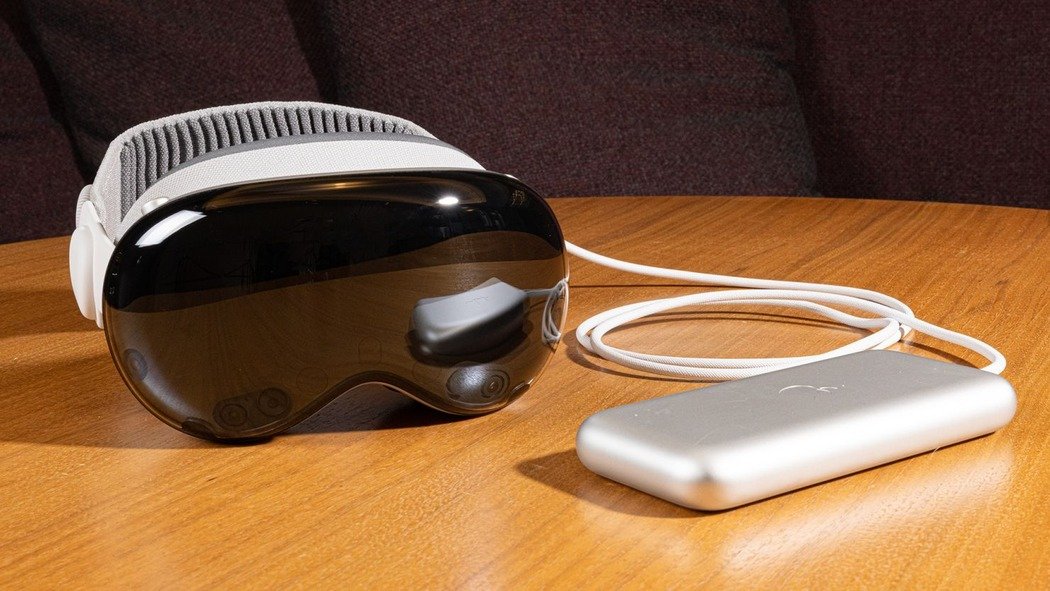
Walking outside was inadvisable. Apple explicitly warns against it. The field of view is too narrow for peripheral hazard detection. The battery pack dangles from a cable. I tried a brief walk on my quiet street and felt vulnerable, disconnected from my environment in ways that felt unsafe.
⚠️ Physical Reality: The Vision Pro weighs 600-650 grams, depending on the configuration. That is roughly the weight of a medium paperback book strapped to your face. For 30 minutes, you notice it. For 2 hours, you feel it. For 4 hours, you need a break. Apple’s marketing shows people wearing it casually. The physical truth is more demanding.
Day 5: Social and Family Impact
The most significant effect was not on me but on my household. My presence while wearing Vision Pro was absent in practice. I was physically in the room but perceptually elsewhere. My partner described it as talking to someone wearing sunglasses indoors—technically possible, socially uncomfortable.
My daughter asked me to remove it when she wanted to show me her drawing. Not because she disliked the device, but because she could not see my reaction. The EyeSight display does not convey genuine facial expression. It conveys that you are wearing a device that simulates facial expression.
I established house rules by day five: no Vision Pro during shared meals or conversations or when others enter the room. This reduced usable time significantly but preserved relationships. The device is not antisocial by intent. It is antisocial by effect.
Day 6-7: Integration and Assessment
By the final days, I had established a usage pattern. Morning work sessions of 2-3 hours for focused writing and research. Afternoon removal for meetings, exercise, and household interaction. Evening media consumption of 1-2 hours. Total daily use: 4-5 hours, split into sessions.
This pattern revealed the Vision Pro’s actual role. It is not a replacement for any existing device. It is a specialized tool for specific contexts: deep-focus work, immersive media, and spatial tasks that benefit from 3D visualization. For everything else — quick messaging, social media, casual browsing, communication — my phone and laptop remain superior.
| Task | Vision Pro | Traditional Device | Winner |
|---|---|---|---|
| Focused writing | Exceptional — distraction-free, resizable windows | Good—multiple monitors and notifications intrude | Vision Pro |
| Video calls | Poor—uncanny persona, isolation from environment | Good — natural eye contact, shared physical space | Traditional |
| Movie watching | Exceptional—immersive scale, spatial audio | Good — shared experience, physical comfort | Vision Pro (solo) |
| Quick messaging | Poor—headset donning, hand tracking overkill | Excellent — phone in pocket, instant access | Traditional |
| Spatial visualization | Exceptional — 3D models, architectural review | Poor—screen-based 3D is abstraction | Vision Pro |
The Hardware Reality
Battery life is 2-3 hours of active use. The external battery pack adds cable management and pocket weight. I kept it plugged in during desk work, which eliminates portability but extends sessions indefinitely.
The displays are the best in any headset. Micro-OLED at 23 million pixels combined eliminates the screen-door effect. Color accuracy matches professional monitors. But the field of view is narrower than natural vision — you see a rectangle of high-quality video surrounded by darkness. Turning your head reveals the edges. It is immersive but not fully natural.
Hand tracking is magical when it works and frustrating when it does not. Resting hands on armrests confuses the system. Crossed arms block tracking. Bright sunlight through windows degrades precision. These are edge cases but accumulate over a week.
Who Should Consider This
The Vision Pro at $3,499 is not a mass-market product. Apple knows this. The current generation targets developers, wealthy early adopters, and specific professional use cases.
Consider if you do focused creative work benefiting from spatial organization—architects reviewing 3D models, surgeons planning procedures, or designers manipulating objects in space. You consume significant solo media and value immersion over social sharing. You develop spatial applications and need reference hardware.
Wait if you want a general computing replacement. The technology is not there. You value social presence during technology use. The isolation is inherent and cannot be fixed with software. You are price-sensitive. Second-generation hardware will likely be lighter, cheaper, and more capable.
Frequently Asked Questions
Does Vision Pro cause motion sickness?
Less than VR headsets because of high-quality passthrough and low latency. But some users report discomfort during rapid head movement or when virtual objects conflict with physical spatial awareness. I experienced mild disorientation after 3+ hour sessions, resolving within 30 minutes of removal.
Can you wear glasses with it?
No. Apple sells Zeiss optical inserts for prescription lenses at $149. These attach magnetically and are precisely calibrated to your prescription. Contact lens wearers report good comfort without inserts. The inserts add cost and reduce field of view slightly.
Is the passthrough video good enough for real-world tasks?
For static tasks — reading printed text, locating objects on a desk, navigating a known room — yes. For dynamic tasks — catching a thrown object, driving, walking in crowds — no. Latency is low but not zero. Resolution is high but not natural. Use it for awareness, not action.
What about productivity apps?
Microsoft Office, Adobe Creative Cloud, and major productivity suites run through compatibility layers or native ports. Performance is adequate for document work. Heavy video editing or 3D rendering pushes thermal limits and drains battery rapidly. This is not a workstation replacement.
Will there be a cheaper version?
Analysts predict a non-Pro Vision headset in 2026-2027 at roughly $1,500-2,000, with lower-spec displays and no EyeSight feature. If you are curious but not committed, waiting is rational. The current hardware is impressive but clearly first-generation.
Final Thoughts
I returned the review unit with mixed emotions. The Vision Pro had become part of my routine in ways I did not expect. My morning writing sessions were genuinely better—more focused, less distracted, more spatially organized. My evening movie-watching was more immersive. But my afternoons felt lighter, more socially connected, and more physically present without the weight on my face.
The device does not solve a problem most people have. It creates a new way of working and consuming that appeals to specific temperaments and use cases. Whether that justifies the cost and compromise depends on how much you value the experiences it uniquely provides.
I will buy the next generation when it arrives. A lighter weight, longer battery, and broader app ecosystem will address my primary reservations. But I will use it deliberately—for specific tasks, in specific contexts, with specific awareness of what I am trading away when I put it on. The Vision Pro is deliberate—for computing. It is a future of computing. Understanding that distinction is essential to using it well.

Robert Chen is a smart home technology consultant and the founder of ClarityTechHub. With over eight years of hands-on experience installing residential solar systems, configuring smart security networks, and optimizing connected home devices, Robert writes from direct practical experience. He has advised more than one hundred homeowners on energy-efficient technology upgrades and regularly tests emerging devices to evaluate real-world performance. All product recommendations and technical guides on ClarityTechHub are based on independent research and firsthand testing.