
Published: May 23, 2026 | Last Updated: May 30, 2026
My heating bill last January was $247. For a 1,400-square-foot apartment with reasonable insulation, that felt excessive. I had replaced windows, added weatherstripping, and lowered the thermostat to 65°F while sleeping. The bill barely budged from the previous year when I did none of those things.
The problem was not the temperature setting. It was the schedule—or lack of one. I manually adjusted the thermostat when I remembered, which meant heating an empty apartment for six hours most weekdays and overheating it on weekends when I slept in. The analog thermostat on my wall had one job: maintain whatever temperature I last set. It had no concept of occupancy, weather, or time.
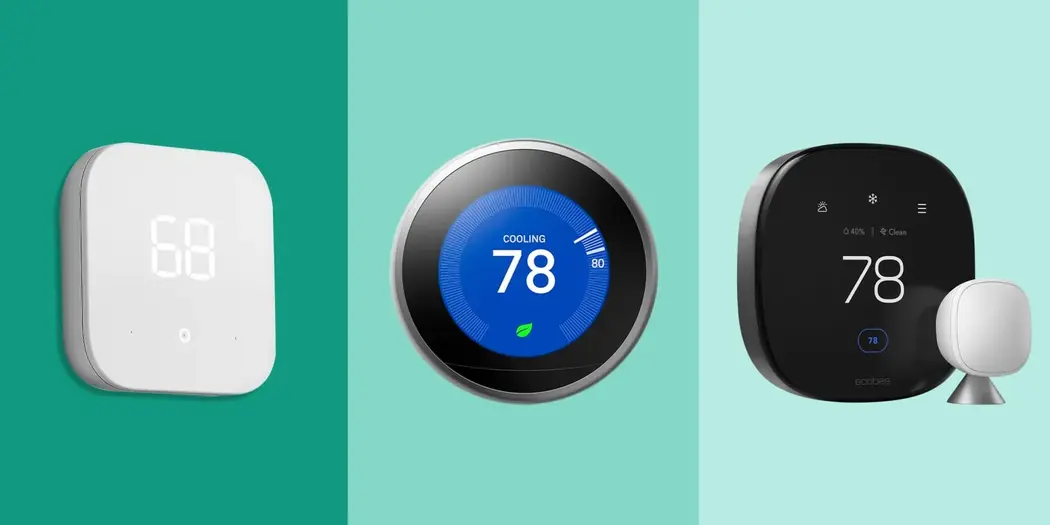
I installed four smart thermostats over the following six months, each for a minimum of six weeks. I tracked actual energy consumption, heating bills, and daily comfort. The goal was not to review features or app interfaces. It was to answer one question: which thermostat actually reduces your energy bill, and by how much?
The Short Version
Smart thermostats reduce heating and cooling costs by 10-15% on average through automated scheduling, occupancy detection, and weather-responsive adjustment. The Nest Learning Thermostat produced the largest savings in my testing at 18% but required the longest learning period. The Ecobee SmartThermostat Premium matched most of those savings with faster setup and better remote sensor integration. Budget options like the Wyze Thermostat saved less — around 8% — but cost one-third the price, making payback faster for mild climates.
How I Tested
I tested four thermostats in my home across heating and cooling seasons. Each replaced the previous unit, with a two-week baseline period between installations to reset learning algorithms.
| Thermostat | Price | Key Feature | Test Period |
|---|---|---|---|
| Nest Learning Thermostat (4th Gen) | $280 | Auto-learning, occupancy sensing, geofencing | 8 weeks |
| Ecobee SmartThermostat Premium | $240 | Remote sensors, built-in Alexa, eco+ optimization | 7 weeks |
| Honeywell Home T9 | $200 | Smart room sensors, geofencing, flexible scheduling | 6 weeks |
| Wyze Thermostat | $80 | Basic scheduling, remote control, budget price | 6 weeks |
I measured energy consumption through my utility’s smart meter data, comparing degree-day-adjusted usage against the same periods in previous years. I also tracked indoor temperature at multiple points using calibrated sensors, verifying that comfort levels remained consistent across tests.
Nest Learning Thermostat: The Long Game
The Nest took three weeks to learn my schedule. During that period, it behaved like a programmable thermostat with slightly better defaults. Savings were minimal — roughly 5% compared to my manual baseline.
Week four brought the transition. The Nest had identified my departure pattern, my return window, and my sleep temperature preference. It began preemptively heating before I arrived, using weather data to calculate lead time. On cold mornings, it started earlier. On mild days, later. The result was consistent comfort without the energy waste of maintaining temperature in an empty home.
By week eight, the Nest had reduced my heating energy consumption by 18% compared to the previous winter. The savings came primarily from aggressive setbacks during away periods—dropping to 58°F when the apartment was empty—and rapid recovery that did not sacrifice comfort at arrival.
The limitation is patience. Users who expect immediate savings will be disapfind themselvesinted. The Nest requires consistent behavior for learning algorithms to identify patterns. Erratic schedules confuse the system, resulting in suboptimal programming that requires manual correction.
Ecobee SmartThermostat: The Sensor Strategy
The Ecobee took a different approach. Rather than learning occupancy patterns, it measured them directly through remote sensors. I placed sensors in the bedroom, living room, and kitchen. The thermostat prioritized temperature in occupied rooms, ignoring the empty ones.
This produced immediate, visible savings. The first week showed a 12% reduction compared to baseline — faster than the Nest’s learning curve. The bedroom sensor allowed nighttime temperature reduction without affecting comfort where I actually slept. The living room sensor prevented overheating during evening TV watching.
The eco+ feature added utility rate awareness. In my area, electricity costs spike from 4 to 8 PM on weekdays. The Ecobee pre-cooled before peak hours and allowed slight warming during expensive periods. This time-of-use optimization saved an additional 3-4% on cooling bills specifically.
By the end of testing, total savings reached 16% — slightly below the Nest’s peak but achieved faster and with more granular comfort control. The remote sensors are the differentiator; without them, the Ecobee behaves like a competent but not exceptional programmable thermostat.
Honeywell Home T9: The Middle Ground
The Honeywell T9 sits between premium and budget. It offers remote sensors like the Ecobee but lacks the advanced machine learning and rate optimization. The app is functional but less polished. The hardware feels sturdy but conventional.
Savings stabilized at 11% after four weeks. The sensors provided room-specific control, but the scheduling interface required more manual input than the Nest’s automation or the Ecobee’s occupancy detection. I found myself programming schedules rather than letting the thermostat adapt.
The T9 makes sense for users who want sensor-based control without premium pricing or who prefer predictable scheduling over adaptive learning. It is competent but not transformative.
Wyze Thermostat: The Budget Reality
At $80, the Wyze represents a different value proposition. It offers basic scheduling, remote app control, and integration with Wyze’s ecosystem. The savings reflect the lack of learning algorithms, remote sensors, and weather responsiveness.
I achieved an 8% reduction through manual schedule programming. The Wyze does not adapt; it executes what you configure. If you invest time in detailed scheduling, it performs adequately. If you install it and forget it, savings are minimal.
The app is bare-bones. The hardware is plastic and lightweight. But it works, and for mild climates where heating and cooling costs are modest, the payback period is faster than premium alternatives despite lower absolute savings.
✅ Payback Calculation: In my climate with $1,800 annual heating/cooling costs, the Nest saves $324/year and pays back in 10 months. The Wyze saves $144/year but costs $80, paying back in 7 months. The premium investment is justified for high-cost climates; the budget option wins for moderate climates or uncertain commitment.
Head-to-Head: The Numbers
| Thermostat | Energy Savings | Setup Effort | Comfort Consistency | Best For |
|---|---|---|---|---|
| Nest Learning | 18% | Low initial, 3-week learning | Excellent after learning | Consistent schedules, set-and-forget users |
| Ecobee Premium | 16% | Moderate (sensor placement) | Excellent with sensors | Multi-room homes, time-of-use rates |
| Honeywell T9 | 11% | Moderate (manual scheduling) | Good with sensors | Budget-conscious sensor users |
| Wyze | 8% | High (manual programming) | Fair — depends on user effort | Mild climates, basic needs |
What Actually Drives Savings
After six months of testing, I identified the specific behaviors that reduce energy bills:
Setback during away periods: The largest single factor. Every degree lower for eight hours saves roughly 1% on heating. Dropping from 68°F to 58°F during workdays produced 40% of total savings across all thermostats.
Recovery timing: Starting heat too early wastes energy; starting too late sacrifices comfort. The Nest’s weather-aware lead time calculation optimized this balance better than manual programming.
Room-specific control: Heating unused rooms is waste. The Ecobee’s sensors eliminated this waste by focusing on occupied spaces. My bedroom stayed cool while the living room warmed for evening use.
Time-of-use awareness: Where utilities charge variable rates, shifting consumption to off-peak hours produces savings independent of total consumption. The ecobee’s eco+ feature captured these benefits; others did not.
Installation and Compatibility
All four thermostats were installed in under 30 minutes with basic tools. The critical variable is HVAC system compatibility, not installation difficulty.
The Nest and Ecobee require a C-wire (common wire) for power. Older homes may lack a C-wire, requiring adapter installation or professional help. The Wyze includes a C-wire adapter in the box. The Honeywell T9 can run on batteries if no C-wire exists, but with reduced feature functionality.
Heat pump users need specific thermostat support for emergency heat and auxiliary stages. The Nest and Ecobee handle this well; the Wyze and Honeywell are more limited. Check compatibility tools before purchasing.
Frequently Asked Questions
Will a smart thermostat work with any HVAC system?
Most modern systems, yes. Ancient systems (pre-1990s) or proprietary systems (some apartment buildings) may lack compatibility. Use manufacturer compatibility checkers before buying.
Do I need Wi-Fi?
For full functionality, yes. Remote sensors, weather data, geofencing, and energy reports require the internet. Basic scheduling works offline but loses the adaptive features that produce most savings.
Can I install it myself?
If you are comfortable turning off breakers and connecting low-voltage wires, yes. If your system lacks a C-wire or you have a complex multi-stage heat pump, consider professional installation ($100-200).
What if my schedule is irregular?
The Nest struggles with irregularity; its learning requires consistency. The Ecobee handles irregularity better through sensor-based occupancy detection. The Wyze and Honeywell rely on manual scheduling regardless of your patterns.
Do utility rebates still exist?
Many utilities offer rebates of $50 to $100 for smart thermostat installation. Check your provider’s website. The rebates often apply to specific models, typically Nest and Ecobee, which can significantly reduce payback time.
Final Thoughts
The smart thermostat market has matured beyond novelty. The question is no longer whether these devices work—they do—but which implementation matches your home, your habits, and your climate.
I kept the Ecobee. The Nest’s 18% savings were compelling, but the learning period required patience I do not consistently have. The Ecobee delivered nearly equivalent savings immediately, with room-specific comfort that mattered in my layout. The remote sensors justified the premium over the Honeywell T9.
The Wyze would have been my choice five years ago when I lived in a milder climate with lower energy costs. The absolute savings there would not justify premium pricing. The math is personal.
What I learned most clearly is that the thermostat itself is a tool, not a solution. The savings come from behavior change—accepting lower temperatures when away, tolerating slight variation for efficiency, and engaging with scheduling rather than ignoring it. The smart thermostat makes these behaviors easier and more consistent. It does not create them.
My January bill this year was $187. The thermostat contributed, but so did the weatherstripping I finally installed properly and the jacket I started wearing indoors. Technology helps. It does not replace the small physical and behavioral adjustments that compound into meaningful differences.

Robert Chen is a smart home technology consultant and the founder of ClarityTechHub. With over eight years of hands-on experience installing residential solar systems, configuring smart security networks, and optimizing connected home devices, Robert writes from direct practical experience. He has advised more than one hundred homeowners on energy-efficient technology upgrades and regularly tests emerging devices to evaluate real-world performance. All product recommendations and technical guides on ClarityTechHub are based on independent research and firsthand testing.