
Published: July 25, 2026 | Last Updated: June 2, 2026
This guide shows how to make a connected home’s electricity arrangement safer and more efficient. Estimate electrical demand, choose power strips and surge protectors, grasp UPSs, organize charging locations, handle networking equipment, limit standby use, and identify problems requiring an electrician. The goal is to create a method that is easier to handle without cluttering your home with extension cords.
Learn How Your Devices Use Power
Check your equipment before buying a new power strip. Different electrical devices have different needs. Desktop computers and huge monitors require more power than phone chargers. Even with a low average power consumption, a laser printer might have high short-term power demands. The label or power adapter of a device can tell you its electrical requirements. Watts, volts, amps, or volt-amperes may be displayed depending on the product. Watts, which measure electrical energy use, are easiest to utilize for household planning.
You can improve your setup without calculating device power consumption. Identifying equipment combinations that potentially load a circuit is crucial. Heaters, cookers, and other large domestic loads require different treatment than chargers and routers. Before attaching unknown equipment to a crowded power strip, check the electrical rating. If requirements are unclear, consult manufacturer literature.
Create a Home Power Inventory
A simple power inventory can reveal issues that scattered devices make hard to spot. Walk through each area and record plugged-in electronics. Televisions, computers, monitors, printers, networking equipment, speakers, chargers, appliances, lamps, and other devices. Group equipment by location. One desk may have seven devices linked to one wall socket, or a TV cabinet may have more connectors than planned. This scenario doesn’t mean the setup is hazardous, but it indicates power management issues.
| Area | Typical Technology | What to Consider |
|---|---|---|
| Home office | Computer, monitors, printer, router, speakers | Total load and backup power |
| Entertainment area | TV, console, soundbar, streaming device | Outlet capacity and cable organization |
| Network area | Router, switch, modem, access point | Continuous operation and UPS support |
| Charging area | Phones, tablets, watches, laptops | Charger quality and heat management |
| Smart-home area | Hubs, bridges, controllers | Reliable continuous power |
Once you know where the equipment is concentrated, it becomes easier to decide whether you need a better arrangement, additional outlets, a suitable power strip, or professional electrical work.
Know the Difference Between Outlets and Circuits
The difference between a wall outlet and an electrical circuit is crucial to household power management. Plugging devices into different sockets does not necessarily spread their electrical load among circuits because multiple outlets can be connected to the same circuit. In electronic-filled spaces, this is easy to miss. If the outlets are separate, you might use one for a computer and another on the opposite wall for a TV. They may share a circuit.
Circuit design, protection device, wiring, local electrical standards, and other factors determine how much electrical load a circuit can safely sustain. Do not enhance circuit capacity, replace safety devices with higher-rated ones, or modify domestic wiring based on an online article. Electrical systems can be dangerous. If a circuit frequently trips when your home technology is on, examine the situation. Rearranging plugs may not fix the issue. A competent electrician can diagnose circuit overload, equipment failure, and other electrical issues.
Use Power Strips Correctly
A power strip helps multiple low- or moderate-power devices share a wall socket. They fit perfectly behind entertainment consoles, desks, and charging stations. The power strip organizes many plugs so they don’t compete for one socket. The key is that a power strip does not increase electrical capacity. Plugging more devices into a strip does not change the load limit of a wall outlet linked to a circuit. The strip just adds connections.
Avoid power strip connections. Safety experts and manufacturers discourage “daisy chaining,” which can overburden or mismanage a setup. Extension cords should not replace residential outlets permanently. Power strips from reputable manufacturers should be checked routinely. Stop using and replace products with damaged plugs, fractured housings, exposed conductors, loose connections, or overheating.
Know How Surge Protection Works
Power strips and surge protectors differ. A basic power strip has many outlets and an on/off switch. Surge protection devices divert or limit excess electricity to safeguard connected equipment from transient voltage events. Surge protectors cannot protect electronics from all electrical events. Design, rating, installation, and electrical disturbance affect its performance. If the manufacturer states that the surge protector has exhausted its protection or the device has sustained considerable damage, it should be replaced.
Surge protection can supplement other protection for expensive or important electronics. Whole-home surge protection may be considered in some homes. A certified specialist should install such equipment using the home’s electrical system according to standards. Surge prevention is not backup power. A surge protector can help with voltage incidents, while a UPS can provide temporary battery power and power conditioning, depending on the model.
When UPS Makes Sense
UPS batteries can provide power when the main electrical source fails. Home technology that needs to stay online during temporary outages can benefit from a UPS. A UPS gives desktop computers time to save work and shut down. Modems, routers, switches, and network storage devices can be supported. Keeping networking equipment powered after a brief outage may prevent home connectivity loss.
Limitations on UPS capacity. The battery cannot power all connected devices, and heavier loads drain it faster. Only attach equipment that needs backup power. Consider capacity and runtime while choosing a UPS. A model that can manage a load may have a limited battery life. UPS units need maintenance and battery replacement depending on design as battery condition varies.
Power Management at Home Office
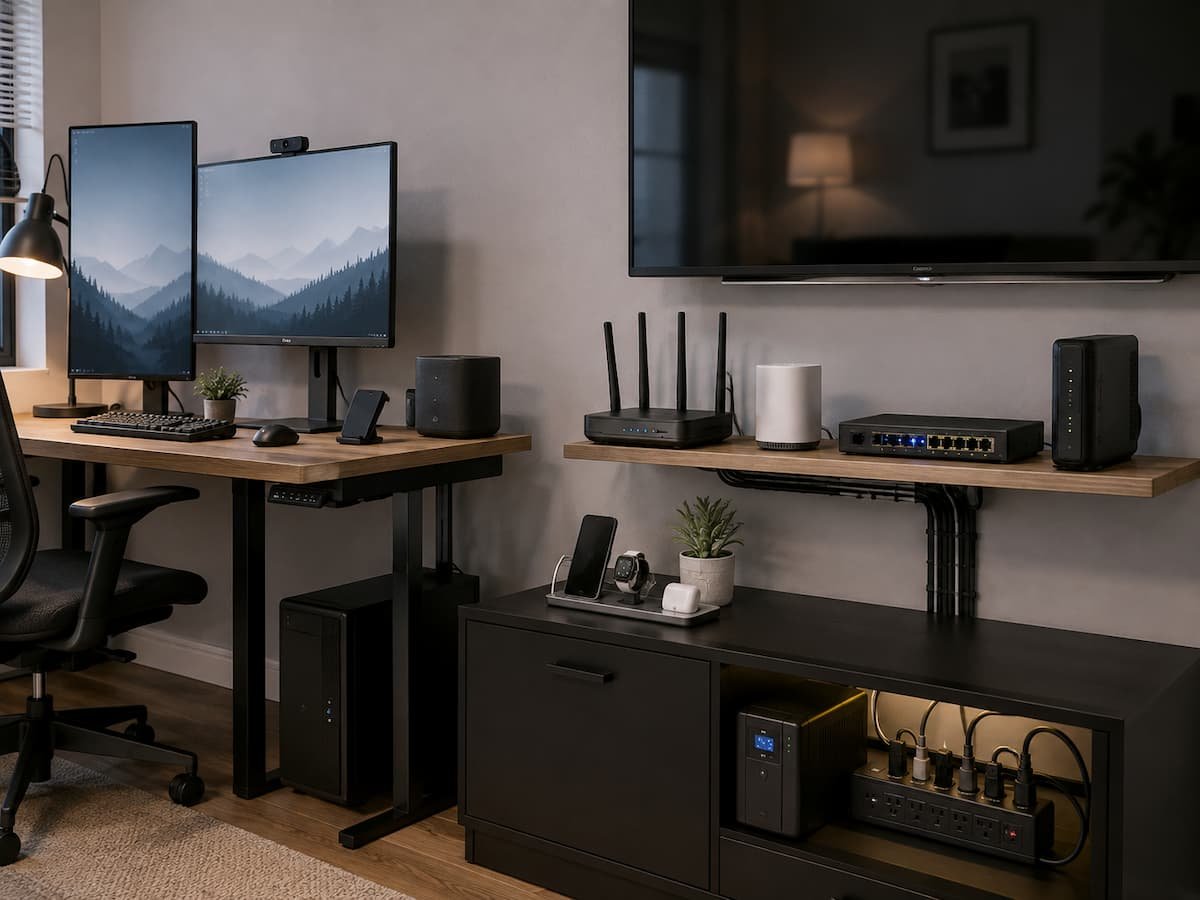
Homes’ most complicated technology areas are generally home offices. A desktop computer, two or three monitors, speakers, a printer, charging equipment, a desk lamp, networking hardware, and other accessories can fit on a desk. Do not connect everything to the first power strip you locate. Sort equipment by significance. UPS protection may benefit a computer and crucial networking equipment but not a decorative light or speaker. Devices without backup power can stay on a reliable power strip.
Place power adapters in airy places. A power strip with well-spaced outlets may be more practical than one with every socket crammed. Large adapters can obstruct neighboring outlets. Do not reset the breaker or add extension cables if a home office often trips circuit breakers. Assess load properly.
Power Management for Entertainment Equipment
Entertainment centers cause another issue. Cables from devices that have been together for years can become hard to distinguish. TV, game console, receiver, soundbar, streaming box, media player, and powered speakers may need separate connections. A good power strip can simplify this region. Put it where you can reach it without taking the TV off the wall. Avoid trapping power bricks under heavy furniture where they cannot disperse heat and label unique adapters if several appear alike. Entertainment devices may use energy in standby, although others use less. Use device power-management settings wherever possible. Do not regularly turn off network devices or systems that need scheduled upgrades.
Running Routers, Switches, and Smart Home Devices
Because it runs silently, network equipment is easy to overlook. Routers, modems, optical network equipment, Ethernet switches, Wi-Fi access points, smart-home hubs, and others can run 24/7. These devices are essential to the connected home, thus powering them is important. If frequent power outages restart the network, a UPS can help keep critical equipment running. Although internet availability depends on the provider’s infrastructure, a modest UPS can keep networking equipment running during short disruptions.
Maintain network equipment ventilation. Heat-producing gadgets should not be stacked unless the manufacturer allows it. Heat can degrade electronics’ lifespan and cause instability. When using PoE equipment, the network switch may power numerous devices. So, choose a switch based on its networking capabilities and PoE power budget.
Improve Charging Area Safety
Phones, tablets, watches, computers, headphones, cameras, and other rechargeable devices can generate a startling number of chargers. A dedicated charging location might make the system easier to monitor and operate than scattered chargers throughout the home. Charge devices with compatible chargers and cords. Do not use broken cables, bent connectors, cracked adapters, or overheated chargers. Many factors can create charging heat, but excessive heat should not be overlooked.
Avoid storing charging equipment under mattresses, cushions, or other heat-blocking items. Handle portable batteries and equipment as the manufacturer directs. Stop using a battery that is bloated, damaged, heated, or otherwise abnormal and follow the manufacturer’s safety instructions. Simple charging stations exist. Organization, not complicated furnishings, is the goal. Chargers in one place make it easy to spot damaged wires before they get worse.
Power Cables Should be Organized and Accessible
Cable management is typically considered cosmetic, yet it affects safety and maintenance. The item attached to each outlet is hard to tell from a mess of connections. It can also obscure broken cords, overheating, and inadvertent disconnections. Where possible, separate power, data, and signal cables and avoid running cables where people walk. Avoid sharp edges, pinching doors, and furniture crushing cords.
A room should not look cleaner by hiding electrical connections under rugs or carpets. You must install and utilize power cords according to their instructions and safety regulations. Adding properly installed outlets is safer than a maze of extension cords in a room without easy outlets. Labeling helps too. Whether a cable powers the router, monitor, printer, or other vital equipment is shown by a little label. This helps under workstations and entertainment centers.
Cut Energy Waste
Power management goes beyond electrical safety. Energy waste can be reduced. Many electrical equipment use electricity in standby mode, however the amount varies. Start with seldom-used gear. Consider examining a printer that lies unused for weeks, an ancient media player, or a collection of constantly connected chargers. Automatic power-saving and sleep modes cut usage without unplugging devices.
Smart plugs help with certain devices, but use them wisely. A smart plug that cuts power regularly should not be used for a gadget that needs constant power. Network equipment, security systems, storage devices, and other continuous technology may have needs. A plug-in energy meter can measure compatible device energy use for reliable data. Measurements are better than guessing because some electronics use less or more standby energy than expected.
Warning Signs of Power Issue
Your home may give you many power arrangement warnings. Never ignore a warm plug or power strip, burning smell, discolouration, buzzing, melted plastic, broken insulation, sparks, or frequent circuit-breaker trips. A circuit breaker or fuse protects. Avoid resetting it if it trips regularly. Overload, defective appliances, wiring issues, and other electrical issues may cause it. Finding the cause is more important than maintaining the circuit.
Warm, damaged, or permanent household electrical extension cords need special attention. Ratings and uses for temporary cords. In permanent power situations, they cannot replace additional outlets. Burning smells, obvious damage, sparking, frequent breaker trips, or melting are reasons to unplug equipment carefully and call an electrician.
Plan Power Before Adding Tech
Power management is easier when technology is arranged before the room fills. When creating a home office, entertainment area, or technology space, count the equipment first. Think about where the devices will go and how much electricity they need. Better opportunities arise with new construction or remodeling. Before building a room with permanent electronics, consult a trained electrician about electrical outlets and circuits. Instead of using extension cords, outlets may be placed where they’re needed.
Consider future adjustments. A spare bedroom could be an office. A TV wall could have a game console and sound system. A garage may have network or charging infrastructure. Planning for acceptable future consumption helps simplify the electrical system without constructing unneeded infrastructure.
Home Technology Power Setup Maintenance
Avoid neglecting power equipment inspection after installation. Power strips, chargers, extension cords, UPS units, and cables should be checked for wear. Avoid covering equipment with clothing, papers, or other things and keep ventilation ports clear. UPS and surge protectors have limited lifespans. For indicator replacement, battery maintenance, and inspection, follow manufacturer instructions. When replacing UPS batteries, use the right type and follow the manufacturer’s instructions.
Also, review your settings after adding a big device. Consider the load before inserting the new equipment into the nearest outlet. This behavior keeps transitory solutions from becoming permanent. A well-managed tech area should be clear. Know what each critical cable powers, which equipment the UPS backs up, and reach the main connections without moving half the room.
Conclusion
Power management for home devices is more about planning than buying accessories. First, determine where your gadgets are, how much power they consume, and which need continuous operation. Power strips make multiple connections easy, but they don’t enhance circuit capacity. Surge protection and UPSs are useful when temporary battery backup is needed.
Good cable management is crucial. Power cords should be exposed for inspection, not damaged or trapped, and not turned into permanent residential wiring. Planning may reduce clutter and confusion in home offices, entertainment spaces, charging stations, and networking equipment. Most importantly, take electrical oddities seriously. Repeated breaker trips, overheating, burning smells, damaged outlets, sparks, or melted components are not routine tech issues. Professional electrical guidance is best for domestic wiring. A well-planned power configuration should simplify your connected home, not add to its complexity.
FAQs
1. Can I use one power strip for multiple electronics?
Yes, if the power strip fits the devices and the load stays within its rating and the supplying circuit’s capacity. A power strip does not enhance circuit electricity. Avoid connecting power strips and using them to add outlets permanently. High-power appliances can load an electrical circuit more than typical electronics, thus they need special attention.
2. Should I connect my router to UPS?
UPS backup can keep a router connected to the local network during temporary power outages. The modem, optical network equipment, and network switch may be on the same backup system, depending on the installation. During a wider outage, your house UPS cannot guarantee internet connectivity because equipment elsewhere in the provider’s network may also lose power. Keeping your equipment operating temporarily is the biggest benefit.
3. Why does my circuit breaker trip when I use many devices?
A recurring trip may suggest a damaged appliance, wiring, or other electrical issue or too much load on the circuit. Moving devices between nearby outlets may not resolve the problem because numerous outlets may share a circuit. Get a professional electrician to inspect the breaker if it keeps tripping, especially with light loads.
4. Does disconnecting chargers save power?
Some chargers and electrical devices use extremely little electricity when connected, even while not charging. The amount varies by design and product. Removing useless chargers helps minimize standby usage, but examining gadgets that are running for long periods may be more beneficial. Instead of making assumptions, use an energy monitor to measure your equipment and get reliable data.
5. Do I need a UPS or surge protector?
Both goods serve various needs. Surge protectors defend against transient voltage events, whereas UPSs combine battery backup with various power-management features, depending on the model. Surge protection may be required to protect electronics from specific power disruptions. A UPS is better for short-term computer or network power during an outage. UPS units may have surge protection.
6. When should I call an electrician?
When you require new or updated domestic wiring, permanent outlets, circuit modifications, repeated breaker trips, or strange electrical behavior, call a trained electrician. Burning smells, broken wiring, sparks, melted outlets, buzzing, and other indicators require professional treatment. Electrical systems are dangerous, thus intricate wiring work should not be done as a DIY networking project just because the equipment is electronic.

ClarityTechHub Editorial Team publishes practical technology guides covering device compatibility, accessibility, home technology, maintenance, and technology setup. Our articles focus on explaining everyday technology problems clearly, comparing practical solutions, and helping readers make informed decisions about the devices and systems they use.