
Published: August 15, 2026 | Last Updated: June 2, 2026
Understanding this hidden layer is useful even if you are not particularly technical. You do not need to become a network engineer to build a dependable connected home. You simply need to know what the major pieces do, how they depend on one another, and where problems are likely to appear. This guide explains the infrastructure behind connected homes in straightforward language, from internet service and Wi-Fi coverage to Ethernet wiring, power, device communication, security, and maintenance. It also explains why adding more gadgets is not always the best way to improve a smart home.
What Makes a Home a Connected Home?
A connected home is not simply a house filled with smart products. It is a collection of devices and services that can exchange information or be controlled through a network. That network may involve smartphones, computers, televisions, cameras, appliances, sensors, speakers, lighting systems, thermostats, doorbells, and many other devices. Each product may have its own processor and software, but it still depends on the surrounding infrastructure to work as intended.
Think of the infrastructure as the roads beneath a city. The devices are the vehicles using those roads. If the roads are poorly designed, congested, or damaged, adding more vehicles does not improve transportation. The same principle applies to connected homes. A new smart camera cannot compensate for weak Wi-Fi. A premium streaming device cannot fix an unstable internet connection. A sophisticated automation system cannot work reliably if the devices constantly lose communication.
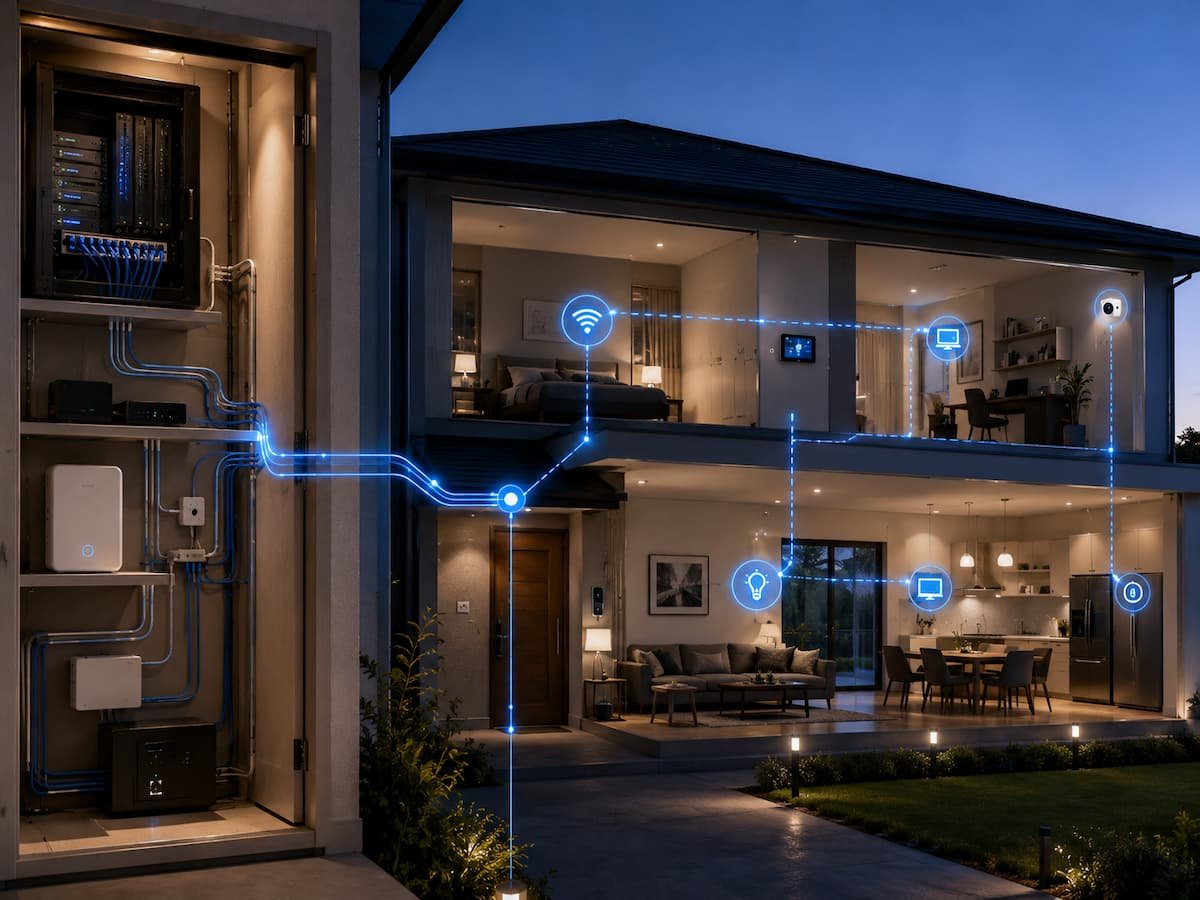
The hidden infrastructure generally includes several layers:
- Internet service entering the property
- Modem or gateway equipment
- Router and local network
- Wi-Fi access points
- Ethernet and other physical wiring
- Electrical outlets and power delivery
- Wireless communication technologies
- Hubs or local controllers
- Cloud services and user accounts
- Security and software updates
The Internet Connection Is Only the Beginning
People often use “internet” and “Wi-Fi” as if they mean the same thing, but they are different parts of a connected home. Your internet connection is the service that links your home network to the wider internet. Wi-Fi is one method your devices use to connect to your local network. A home can therefore have fast internet service but poor Wi-Fi coverage, or strong Wi-Fi coverage but a slow or unreliable internet connection.
Your internet service provider typically delivers the connection to a modem, optical network terminal, gateway, or similar equipment. Depending on the setup, that equipment may also include routing and wireless functions. The important point is that the service entering the home is only one part of the system. Once the connection reaches your property, the local network determines how computers, phones, televisions, cameras, and other devices communicate.
The Home Network at the Center of Everything
The router is one of the most important pieces of hidden infrastructure in a connected home. It helps devices communicate with one another and manages traffic between the local network and the internet. Depending on the equipment, the router may also provide Wi-Fi, basic security functions, address assignment, and other network services.
As the number of connected devices grows, the router becomes increasingly important. A household might have phones and computers connected alongside televisions, printers, cameras, speakers, thermostats, game consoles, appliances, and sensors. Most of these devices are individually lightweight users, but together they create a more complicated network environment.
| Infrastructure Component | Main Job | Possible Problem |
|---|---|---|
| Internet connection | Connects the home to online services | Slow or unstable service |
| Router | Manages local network traffic | Overloaded or outdated equipment |
| Wi-Fi access point | Provides wireless connectivity | Weak coverage or interference |
| Ethernet switch | Connects wired devices | Insufficient ports or poor cabling |
| Ethernet cable | Carries wired network traffic | Damage or poor installation |
| Hub/controller | Coordinates compatible devices | Compatibility or software issues |
Why Wi-Fi Coverage Matters So Much
Wireless networking gives connected homes their flexibility, but radio signals do not travel perfectly through buildings. Walls, floors, furniture, appliances, construction materials, and distance can all affect signal quality. A router located in one corner of a house may provide excellent service nearby while leaving distant rooms with weak connectivity.
This becomes particularly important when connected devices are installed in less convenient locations. A smart camera may be placed near a driveway, a sensor may sit in a basement, or a streaming device may be several rooms away from the router. The device may be perfectly functional, yet its connection may be unreliable because of the environment around it. Placement matters. A router generally performs better when it is positioned in a relatively open and central location rather than hidden inside furniture or placed behind large obstacles. Larger homes may benefit from additional access points or a properly designed mesh system.
Signs that Wi-Fi may be the real problem
- Devices work normally when close to the router.
- Problems appear only in certain rooms.
- Smart devices repeatedly disconnect and reconnect.
- Streaming quality changes depending on location.
- Moving a device slightly changes its reliability.
- Internet speed is good near the router but poor elsewhere.
The Role of Ethernet and Structured Wiring
Wireless technology gets most of the attention in smart-home discussions, but physical networking remains extremely useful. Ethernet provides a direct wired connection between compatible equipment. It is particularly valuable for devices that stay in one location and need reliable communication, such as desktop computers, televisions, game consoles, network storage, security equipment, and Wi-Fi access points.
Structured wiring takes the idea further by planning network cabling as part of the home’s physical infrastructure. During construction or renovation, Ethernet cables can be routed through walls to strategic locations. This can reduce dependence on wireless connections and make it easier to place access points exactly where they are needed.
Even if you live in an existing home where installing new cables would be difficult, it is worth recognizing which devices could benefit from wired connections. Using Ethernet for a few high-demand stationary devices can leave more wireless capacity available for mobile equipment and smaller connected devices. Wireless is convenient, but a reliable wired connection is often the better foundation for devices that do not need to move.
The Electrical Infrastructure Behind Smart Devices
Every connected device needs power, yet power requirements are often ignored during technology planning. Some products use standard wall outlets, others rely on batteries, and some are powered through Ethernet or dedicated electrical connections. The location of available power can determine where a device can realistically be installed.
Battery-powered sensors are convenient because they do not require new wiring, but batteries eventually need replacement. A camera or smart display that operates continuously may be better suited to permanent power. Devices installed outdoors or in damp areas require additional consideration because ordinary indoor equipment may not be appropriate for those environments.
Power strips and extension cables can help in some situations, but they should not become a permanent substitute for proper electrical planning. Avoid overloading outlets or using inappropriate equipment simply to place a smart device somewhere convenient. For electrical work that requires changing wiring, adding outlets, or modifying fixed installations, use a qualified professional where required by local rules.
How Connected Devices Communicate
Not every connected device communicates in exactly the same way. Wi-Fi is familiar, but homes may also contain devices using Bluetooth, Zigbee, Z-Wave, Thread, Ethernet, or other technologies. Each communication method has different characteristics involving range, power consumption, network design, and compatibility.
This variety can be useful because different technologies suit different jobs. A battery-powered sensor may benefit from a low-power wireless protocol, while a television may be better connected through Ethernet or Wi-Fi. A system may also use a dedicated hub to coordinate devices that do not communicate directly through the home’s primary Wi-Fi network.
| Connection Type | Typical Strength | Common Use |
|---|---|---|
| Ethernet | Reliable wired connection | Computers, TVs, access points |
| Wi-Fi | Flexible and widely supported | Phones, laptops, cameras, appliances |
| Bluetooth | Short-range convenience | Accessories and nearby devices |
| Thread | Low-power mesh networking | Supported smart-home devices |
| Zigbee/Z-Wave | Low-power device networking | Sensors, switches, automation devices |
The important lesson is that “wireless” is not one technology. When choosing equipment, check which communication method it uses and whether your existing infrastructure supports it.
Hubs, Controllers, and Local Control
Some connected devices communicate directly with your router and cloud service. Others depend on a hub or controller that sits between the devices and the rest of the network. A hub can provide a central point for managing compatible equipment and may support communication technologies that the router itself does not.
Controllers can also influence how much of the system continues to work when the internet connection is unavailable. Some systems rely heavily on cloud services, while others can perform certain automations locally. This distinction matters if you want lights, sensors, or other functions to respond quickly or continue operating during an internet outage.
Before purchasing a hub-based system, check which devices it supports and whether the hub itself requires an internet connection for important functions. Adding a hub creates another piece of infrastructure that needs power, software updates, account management, and occasional troubleshooting.
The Cloud Services You Rarely See
A connected home often depends on remote servers even though those servers are physically nowhere near the house. When you use a phone app to view a camera feed, change a thermostat setting, receive a notification, or control a device while away from home, the service may communicate through the manufacturer’s cloud infrastructure.
Cloud services can make connected devices convenient because they provide remote access, account synchronization, notifications, software updates, and storage. However, they also introduce dependencies. If the internet connection fails, a cloud service becomes unavailable. If a manufacturer changes its service, some functionality may also change.
This is one reason to examine a product’s long-term support before buying it. Ask what happens if the subscription ends, whether basic functions work without internet access, and whether the device can still be used if the manufacturer eventually changes its service. A device that works without the internet is not necessarily the same as a device that works without its manufacturer’s cloud service. Read the product documentation carefully.
Security Is Part of the Infrastructure
Security is not a separate accessory that can simply be added later. It is part of the infrastructure itself. Every connected device introduces another account, application, communication path, or piece of software that may require maintenance.
Start with the router. Change default administrative credentials when appropriate, use modern security settings supported by your equipment, keep firmware updated, and avoid exposing unnecessary services to the public internet. Then consider the individual devices. Use unique passwords where passwords are supported, enable multi-factor authentication on important accounts, and install updates from legitimate sources.
Privacy deserves equal attention. Cameras, microphones, location features, and connected appliances can collect information about household activity. Before installing a device, understand what information it collects and which permissions are necessary. A convenient feature is not automatically worth every possible privacy trade-off.
Physical Placement Can Make or Break Reliability
Technology infrastructure is physical even when its functions feel digital. The location of a router, hub, camera, speaker, sensor, access point, or smart appliance can influence how well the system performs.
A Wi-Fi access point placed behind a large metal object may perform differently from one positioned in an open area. A hub placed too far from compatible low-power devices may have difficulty communicating with them. A camera positioned without considering its network connection may repeatedly drop offline. A smart speaker placed inside a cabinet may have reduced audio quality and microphone performance.
Before installation, consider signal path, power, heat, moisture, physical obstacles, accessibility, and maintenance. Good placement can sometimes solve a problem that would otherwise lead to buying additional equipment.
Why More Devices Can Change Network Performance
Adding one smart plug to a home network is unlikely to create a major challenge. Adding dozens of devices with cameras, video streams, cloud synchronization, downloads, and frequent communication is a different situation. Network performance depends not simply on the number of devices but on what those devices are doing.
A temperature sensor that communicates occasionally uses network resources differently from a security camera that continuously sends video. Several people streaming high-resolution video while computers download large files can also place greater demands on the network.
This does not mean you should avoid connected technology. It means you should understand the workload. High-bandwidth stationary devices may benefit from Ethernet, while lightweight devices can remain wireless. Separating network-intensive equipment from low-demand devices through sensible network design can make the overall system more predictable.
How to Plan Infrastructure Before Adding Technology
The best time to think about infrastructure is before buying devices. Begin with a simple map of the home. Mark the location of the internet connection, router, existing Ethernet outlets, major electrical outlets, televisions, computers, workspaces, and areas where you expect to install connected equipment.
Next, identify weak points. Is Wi-Fi unreliable upstairs? Is there no Ethernet connection near the home office? Are there too few electrical outlets near the entertainment center? Does the basement have poor wireless coverage? These observations help you improve the foundation before installing technology on top of it.
A practical planning sequence
- Identify the rooms and activities that depend on technology.
- Check the quality of the existing internet connection.
- Test Wi-Fi coverage throughout the home.
- Identify locations where Ethernet would be useful.
- Review available electrical power.
- Choose communication technologies and platforms carefully.
- Plan security and account management.
- Add devices gradually and test each major change.
Maintaining the Infrastructure Over Time
A connected home is not a set-it-and-forget-it system. Routers, access points, hubs, applications, and connected devices receive updates and sometimes develop problems. Regular maintenance helps keep the infrastructure reliable.
Check for firmware updates from manufacturers, remove devices you no longer use, review connected accounts, and replace failing cables or power equipment. If a device repeatedly disconnects, investigate the underlying cause rather than repeatedly restarting it without understanding why.
Keep a basic record of your infrastructure. Knowing the router model, access point locations, hub names, major device accounts, and cable locations can make troubleshooting much easier. This is particularly useful when more than one person manages the home or when equipment needs to be replaced.
Troubleshooting Problems at the Infrastructure Level
When a connected device stops working, the device itself is not always the problem. Troubleshooting becomes easier when you work from the foundation upward.
1. If one device is offline
Check whether other devices in the same location are working. If nearby equipment is fine, investigate the individual device, its power source, or its application. If several devices in the same area are offline, look at Wi-Fi coverage or a local access point.
2. If the entire home loses connectivity
Check the internet service, modem or gateway, router, and cabling. Determine whether the issue affects the local network or only the connection to the internet. Devices connected to each other locally may continue working even when the internet is unavailable, depending on how the system is designed.
3. If devices work but respond slowly
Look for network congestion, weak wireless signals, overloaded equipment, or cloud-service delays. A slow response does not necessarily mean the device’s processor is too slow. The delay could occur somewhere else in the communication path.
Conclusion
The technology within a connected house can only be as good as the infrastructure that supports it. A chain of physical and digital systems underpins every smart-home routine, automatic notification, video stream, and easy app management. Internet service connects the home to the internet. The router handles local traffic and Wi-Fi and Ethernet link devices. Power keeps it all going. Communication protocols allow devices to communicate with one another. Cloud services often offer remote access and synchronization.
Understanding these levels impacts how you think about home electronics. Before you spend money on another gadget when something seems uncomfortable, ask yourself if the problem is coverage, wiring, power, compatibility, placement, or network architecture. With this easy change, you may save on extra spending and get more out of your existing technology.
A connected house that works needn’t be difficult. Start with a solid foundation, select equipment that fits inside the infrastructure you now own, lock down every critical piece, and build out slowly. The best tech setup isn’t the one with the most devices. It is the one that works behind the scenes quietly, supporting daily life without demanding attention all the time.
FAQs
1. Do smart home devices require Wi-Fi?
Nope. Some devices communicate using Ethernet, Bluetooth, Thread, Zigbee, Z-Wave, or something else. A gadget could potentially communicate with a specialized hub rather than your Wi-Fi network. Useful to check the communication technology before buying so you know if there is any additional infrastructure needed.
2. Is a linked house reliable just because the Internet is faster?
No, the speed of the internet is just one part of the system. The house could have a fast Internet connection but a weak Wi-Fi signal, bad positioning of the router, interference, damaged wires, or overloaded equipment. If a device is working well close to the router, but poorly in another room, the problem could be with the local wireless coverage rather than the speed provided by the internet service.
3. Do I need Ethernet in a modern smart home?
You may have a connected house without a lot of Ethernet, but wired connections are still useful. You might want to hardwire stationary, high-demand devices such as desktop computers, TVs, game consoles, network storage, and wireless access points. Ethernet can also take work off Wi-Fi and deliver more reliable performance in areas where wireless signals are difficult to maintain.
4. What’s the difference between a Wi-Fi extension vs. a router?
A router directs traffic on a network. It often connects your local network to the internet. Wi-Fi extender — A device that relays a signal and extends wireless coverage. An extension does not replace the primary networking role of the router. In bigger houses, a well-configured mesh or multi-access point solution could give a better experience than just dumping cheap extenders all over the place.
5. Can smart devices work while the internet is down?
It depends on how the system is built. Some devices can still conduct local functions because they communicate directly with each other or via a local controller. Other goods are largely dependent on cloud services and may lose critical functionality if an internet connection is not present. Before acquiring equipment, determine which functions require internet access and which may run locally.
6. Why do smart devices sometimes disconnect even when Wi-Fi seems fine?
Wireless signal strength is merely one possible factor. Devices can disconnect because of interference, network settings, firmware problems, overloaded equipment, power disruptions, cloud-service issues, or compatibility concerns. If just one device has a problem, check that device first. If numerous devices in the same physical region have problems, evaluate the local network environment and wireless coverage.
7. Do I have to get a new router every couple years?
There is no standard replacement timetable. When choosing a router, consider its performance, security support, compatibility, coverage, and your household requirements. If it’s still reliable, receives the correct upgrades, and satisfies your home’s needs for the network, you don’t have to replace it just because it’s aging. But equipment that is either unsupported or obsolete demands more careful thought.

ClarityTechHub Editorial Team publishes practical technology guides covering device compatibility, accessibility, home technology, maintenance, and technology setup. Our articles focus on explaining everyday technology problems clearly, comparing practical solutions, and helping readers make informed decisions about the devices and systems they use.